Async and the Event Loop
Futures, async and await, the microtask and event queues, and error handling in async code.
Synchronous vs asynchronous code
In programming, especially in Flutter and Dart, understanding the difference between asynchronous and synchronous data handling is essential for building responsive applications.
Synchronous code
Synchronous data processing happens immediately and in sequence. When you request data synchronously, your code waits (blocks) until the operation completes before moving to the next line.
Characteristics
- Blocking: The program waits for the operation to complete before continuing execution
- Sequential: Operations happen one after another in a defined order
- Predictable flow: Easier to follow and debug as code executes in the order it's written
- Immediate results: Data is available right after the operation
Asynchronous code
Asynchronous data processing allows your program to continue execution while waiting for an operation to complete. When the operation finishes, a callback is triggered or a Future/Promise resolves with the data.
Characteristics
- Non-blocking: The program continues execution while waiting for the operation
- Parallel: Multiple operations can happen simultaneously
- Event-driven: Relies on callbacks, Futures, or Streams to handle completion
- Delayed results: Data becomes available at some point in the future
Side by side
| Aspect | Synchronous | Asynchronous |
|---|---|---|
| Execution | Blocks until complete | Continues execution while waiting |
| Use cases | Simple, fast operations | Network requests, file I/O, long calculations |
| Code complexity | Simpler, linear | More complex with callbacks/futures |
| Performance impact | Can freeze UI if operation takes long | Keeps UI responsive |
| Error handling | Try-catch blocks | Try-catch with async/await or .catchError() |
| Data flow | Direct return values | Futures, Streams, or callbacks |
Picking one
Use Synchronous Processing When:
- The operation is simple and quick
- The data is needed immediately before continuing
- The code flow is more important than responsiveness
- Working with in-memory data
Use Asynchronous Processing When:
- Dealing with I/O operations (network, file, database)
- The operation might take a long time
- UI responsiveness is critical
- You need to perform multiple operations concurrently
In Flutter applications, asynchronous data handling is especially important to keep the UI responsive while fetching data from APIs, reading files, or performing database operations.
Streams are one of the core concepts in Flutter for handling asynchronous data. They represent a sequence of asynchronous events, similar to a pipe where you put values in one end and listen for them at the other end.
Future vs Stream
Both hand you a value later. The difference is how many values, and whether the thing ever finishes.
Future
A Future represents a single asynchronous value that will be available later.
Think of it like a promise of one result.
Example:
Future<String> fetchUser() async {
  return "John";
}
Usage:
fetchUser().then((user) {
  print(user);
});
or
String user = await fetchUser();Stream
A Stream represents multiple asynchronous values over time.
Think of it like a data pipeline or event flow.
Example:
Stream<int> counter() async* {
  for (int i = 1; i <= 5; i++) {
    await Future.delayed(Duration(seconds: 1));
    yield i;
  }
}
Usage:
counter().listen((value) {
  print(value);
});
or
await for (var value in counter()) {
  print(value);
}
Side by side
| Feature | Future | Stream |
|---|---|---|
| Values | Single value | Multiple values |
| Completion | Once | Multiple events |
| Usage | HTTP request | WebSocket, UI events |
| Methods | then(), catchError() | listen(), map(), where() |
Example analogy:
Future → ordering food (one result)

Stream → YouTube live stream (continuous data)async, async*, and sync*
When working with asynchronous programming in Dart and Flutter, you'll encounter different function modifiers: async, async*, and sync*. Each serves a specific purpose in handling different types of operations.
async
The async modifier is used for functions that perform asynchronous operations and return a single value in the future.
Key characteristics
- Returns a
Future<T>object - Allows the use of
awaitkeyword inside the function - Completes with a single value (or error)
- Used for one-time asynchronous operations
async*
The async* modifier is used to create asynchronous generator functions that produce a sequence of values over time.
Key characteristics
- Returns a
Stream<T>object - Uses
yieldto emit values to the stream - Can emit multiple values over time
- Used for continuous asynchronous data sources
sync*
The sync* modifier creates synchronous generator functions that produce a sequence of values on demand.
Key characteristics
- Returns an
Iterable<T>object - Uses
yieldto emit values to the iterable - Values are generated on-demand when iterated
- No asynchronous operations inside (no
await) - Computation pauses between yielded values but doesn't involve the event loop
Side by side
| Feature | async | async* | sync* |
|---|---|---|---|
| Return type | Future<T> | Stream<T> | Iterable<T> |
| Number of values | Single | Multiple | Multiple |
| Timing | Asynchronous | Asynchronous | Synchronous |
| Use with | await | await for | for or forEach |
| Emit values with | return | yield | yield |
Picking one
- Use
async: For operations that return a single result after some asynchronous work (API calls, file operations) - Use
async*: For operations that produce multiple values asynchronously over time (WebSocket connections, continuous sensor data, real-time updates) - Use
sync*: For operations that generate a sequence of values synchronously but need to be computed on-demand (number sequences, pagination, custom iterables)
In Flutter development, these are particularly useful for:
async: HTTP requests, database operationsasync*: Real-time UI updates, animations with varying states, event streamssync*: Efficient processing of large datasets, custom collection behaviors
What async and await compile to
In Dart, async/await is syntactic sugar over Futures and state machines.
Example:
Future<int> getData() async {
  int a = await fetchA();
  int b = await fetchB();
  return a + b;
}
Internally this becomes something like:
Future<int> getData() {
  return fetchA().then((a) {
    return fetchB().then((b) {
      return a + b;
    });
  });
}
But the real compilation is closer to a state machine:
Pseudo representation:
state0 -> call fetchA
state1 -> wait result
state2 -> call fetchB
state3 -> return result
So the compiler transforms:
async function
↓
state machine
↓
Future chain
Benefits:
-
cleaner code
-
easier error handling
-
sequential logic
The event loop and microtasks
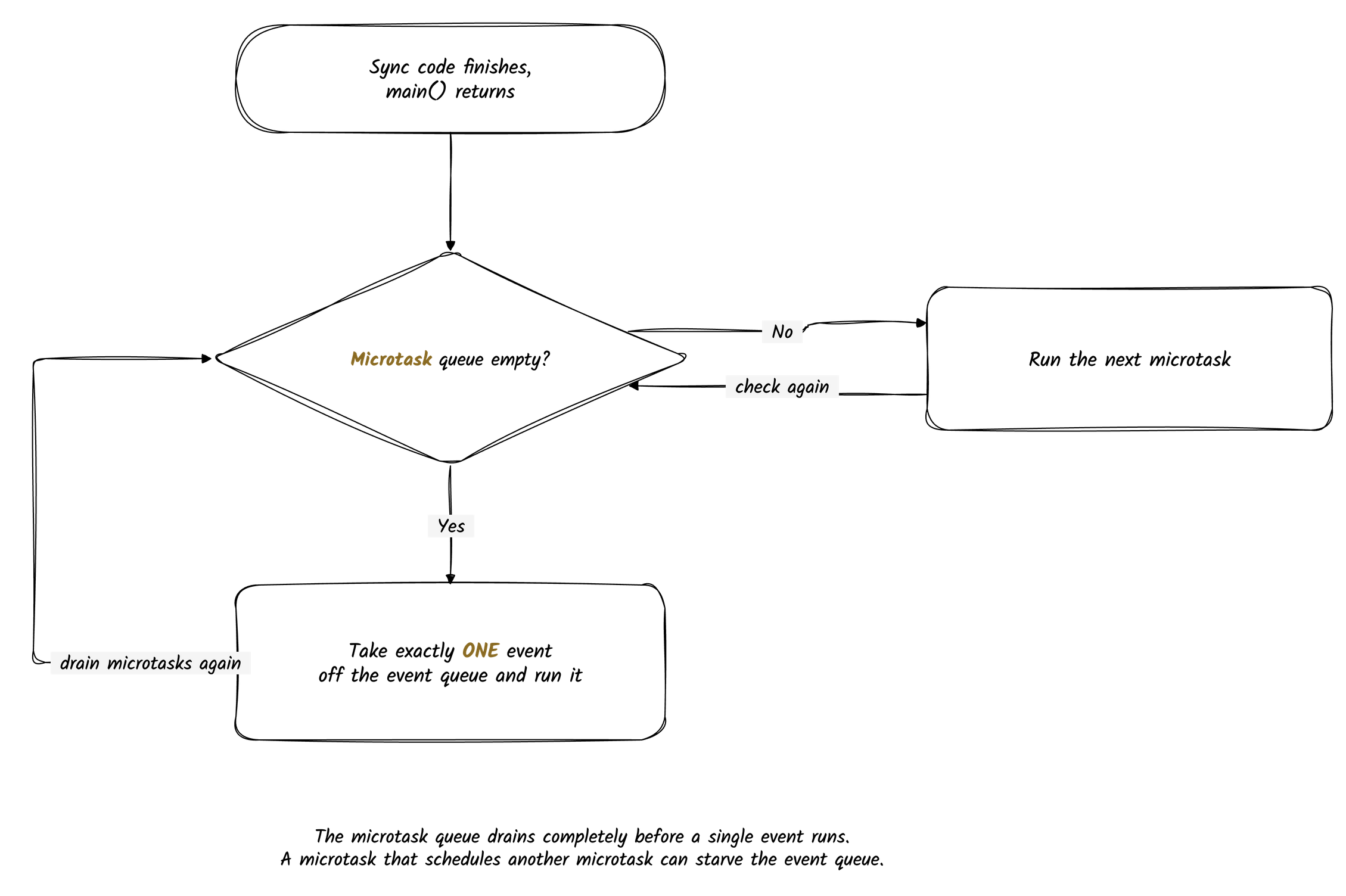
Dart runs async code on a single thread inside an isolate. An event loop decides what runs next by pulling work from two queues:
Microtask Queue (higher priority)
Event Queue (lower priority)
The cycle:
Synchronous code
       |
Drain ALL microtasks
       |
Take ONE event
       |
Run that event to completion
       |
Drain ALL microtasks it created
       |
Take the next event
       |
Repeat
Synchronous code runs first
Whatever is already on the call stack finishes before the loop looks at either queue.
print("A");
print("B");
Both print immediately, in that order.
The microtask queue
The microtask queue holds small pieces of work that must run before the next event. You schedule one with:
scheduleMicrotask(() {
  print("microtask");
});
or
Future.microtask(() {
  print("microtask");
});
Callbacks attached to an already completed future land here too:
future.then(...)
future.catchError(...)
future.whenComplete(...)
Dart drains the whole microtask queue before it touches the event queue.
The event queue
The event queue holds everything else: timers, Future.delayed, Future(...), I/O, network and
platform responses, user input, and platform messages.
Timer(Duration(seconds: 1), () {
  print("Timer");
});

Future(() => print("event task"));
Dart takes one event at a time and runs it to the end.
The exact draining rule
The microtask queue does not drain one item at a time. It drains completely, including microtasks added while it is draining.
run all microtasks
run ONE event
run all microtasks
run ONE event
...
An event is never cut short. If an event schedules microtasks while it runs, Dart still finishes the event, then drains those microtasks, then takes the next event.
Event 1
   |
   creates Microtask A
   creates Microtask B
   |
Event 1 finishes
   |
Microtask A
Microtask B
   |
Event 2
This is why a microtask that schedules another microtask can starve the event queue forever. Keep microtask work tiny.
Classification cheat sheet
The whole topic reduces to putting each line in one of three buckets.
| Code | Bucket |
|---|---|
| Plain statements | sync |
Future.sync(f) | sync |
Body of an async function up to the first await | sync |
scheduleMicrotask(f) | microtask |
Future.microtask(f) | microtask |
.then on an already completed future | microtask |
Everything after an await | microtask |
Future(f) | event |
Future.delayed(...), including Duration.zero | event |
Timer, Timer.periodic, I/O, isolate messages, gestures | event |
The one that catches people: Future(() {}) is the event queue, not a microtask. It looks like
the most basic future, so it gets assumed to run first. It runs last.

Future constructors compared
scheduleMicrotask(f);        // microtask, returns nothing
Future.microtask(f);         // microtask, returns a Future so you can chain or await
Future.value(x);             // already complete, .then on it is a microtask
Future.sync(f);              // runs f IMMEDIATELY, synchronously
Future(f);                   // event queue, zero duration timer via Timer.run
Future.delayed(d, f);        // event queue, timer of duration d
Future.sync is the useful oddity. It runs now but keeps any thrown error inside the future
instead of throwing at the call site.
What await actually does
await suspends the function and turns the rest of the body into a continuation scheduled as a
microtask.
Two consequences worth remembering:
// 1. An async function runs SYNCHRONOUSLY up to its first await.
Future<void> f() async {
  print('runs immediately');   // not deferred
  await something;
  print('runs as a microtask');
}

// 2. await on a non-Future STILL suspends.
await null;   // not a no-op, the rest of the function yields
await 5;      // same
Do not try to count exact microtask hops. Implementations have changed across Dart versions. Reason about relative order, which is what is actually being tested.
Concurrency is not parallelism
async changes when code runs, not where. One thread per isolate.
Future<void> heavy() async {
  for (var i = 0; i < 1000000000; i++) {}   // still blocks the isolate
}
await does not move work off the thread. A long synchronous loop inside an async function
blocks the UI isolate and drops frames. For CPU bound work you need an isolate or compute(),
which get their own thread, heap, and event loop.
Output prediction drills
Classify every line, write three lists (sync, microtask, event), then read the output off in order.
Traps worth memorising
1  Future(() {}) is the EVENT queue, not a microtask
2  await null still suspends
3  Duration.zero is still the event queue
4  returning a Future from .then makes the chain wait for it
5  the microtask queue drains FULLY, including microtasks added mid-drain
6  Future.wait does not cancel the remaining futures on error
Why this matters in Flutter
The event loop is per isolate, and the UI runs on one isolate. The framework's frame callbacks sit on that same loop.
long sync block      → frame callback never runs → dropped frame
unbounded microtasks → event queue starved      → frozen UI
This is the mechanism behind jank. It connects directly to RepaintBoundary in
layout-and-rendering and to the profiling advice in performance.
Error handling in async code
An error inside async code does not travel up the call stack. It completes the future with an error instead, which changes where you can catch it and how easily you can lose it.
Future chain
Example:
fetchUser()
  .then((user) {
    return fetchOrders(user);
  })
  .then((orders) {
    print(orders);
  })
  .catchError((error) {
    print(error);
  });
Error handling happens using:
.catchError()async/await
Cleaner approach:
try {
  var user = await fetchUser();
  var orders = await fetchOrders(user);
  print(orders);
} catch (e) {
  print(e);
}
Side by side
| Feature | Future chain | async/await |
|---|---|---|
| Syntax | then() | try/catch |
| Readability | harder | easier |
| Debugging | harder | easier |
| Flow | callback style | synchronous style |
Unhandled errors
A throw inside an async function does not propagate synchronously. It
completes the returned future with an error. If nothing awaits or catches it, it becomes an
unhandled async error and reaches the zone handler, which in Flutter means FlutterError.onError
or PlatformDispatcher.instance.onError.
An error handler attached later still works, because the error is stored on the future. Discard the future entirely and the error is lost to the zone.
Future.wait does not cancel
await Future.wait([a, b, c]);Completes with a list in input order, not completion order. On error it completes with the first error, and the other futures keep running. Their errors become unhandled.
Future.wait(
  futures,
  eagerError: true,                 // fail as soon as any one fails
  cleanUp: (value) => value.dispose(),  // dispose results that arrive after the error
);
Dart futures have no cancellation. That is the part people miss.
return vs return await in a try block
// error is NOT caught: the try block has finished before the error happens
Future<int> a() async {
  try {
    return riskyFuture();
  } catch (e) {
    return -1;
  }
}

// error IS caught: await keeps the function suspended inside the try
Future<int> b() async {
  try {
    return await riskyFuture();
  } catch (e) {
    return -1;
  }
}
This is the one case where return await is meaningful rather than redundant.